


|
Navigation
Search
|
Traveling for the holidays? Pack these 13 essential iPhone apps and gadgets
Monday December 22, 2025. 01:15 PM , from Mac 911
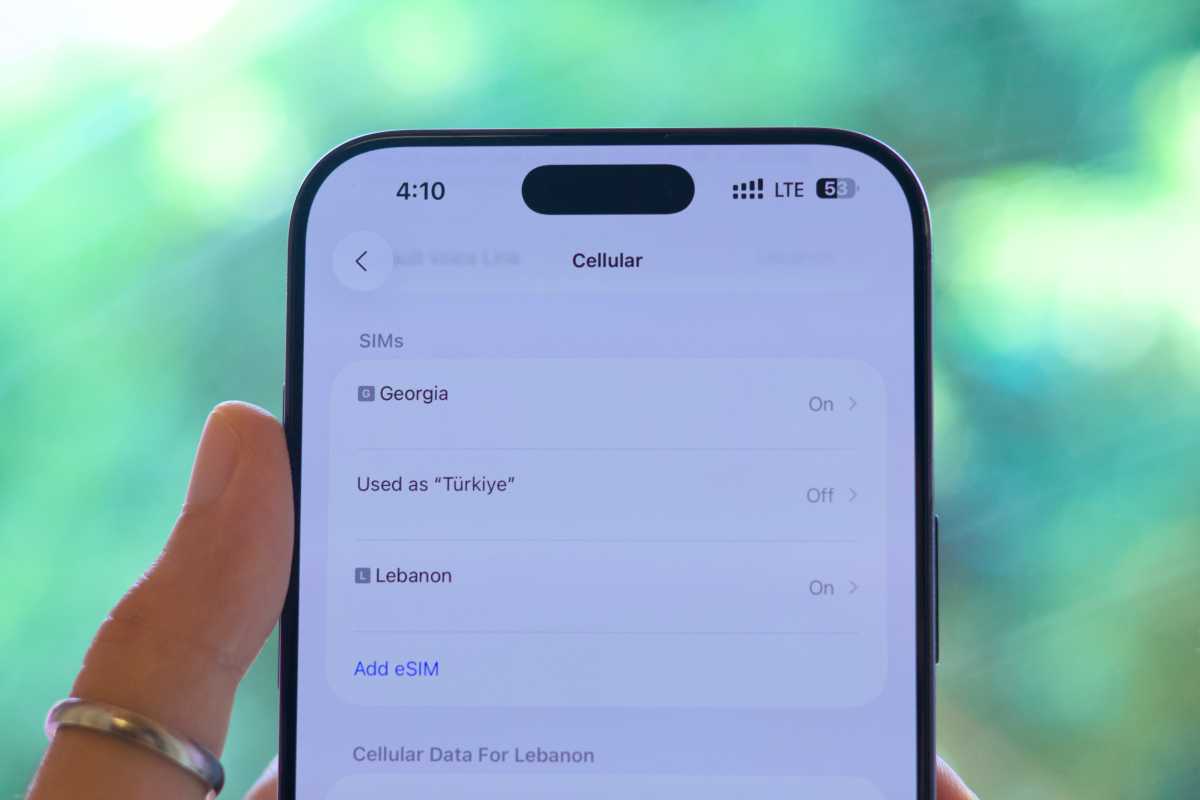
I’ve had more than a few mornings where I’ve woken up, impulsively booked a one-way ticket to a foreign country, tossed some clothes in a bag, and flown off solo. A couple of decades ago, that kind of spontaneity would’ve been far less practical. Today, thanks to remote work and some new-ish inventions, the process is easier than ever before. No matter your destination, reason for travel, or length of stay, your iPhone can help you plan and make the most of your trip. Your exact needs will depend on your travel style, but for nearly every journey, these 13 apps and gadgets are worth packing. 1. Flight finder First, you’ll need to book your flight, and, in most cases, the available airlines are numerous. Instead of manually checking each airline’s website to compare air fares, you could use services like Google Flights and Expedia. Said websites list the various options and help you skim through them to find the most affordable or convenient flight. Once booked, you may also want to download a flight tracker, like Flighty, to get notified about important updates. These include potential delays, the gate number, your flight’s status, and much more. 2. Accommodation rental service You’ll then need to figure out where you’re staying. After picking a city of interest, you may want to use apps like Airbnb or Booking.com to find a rental apartment or hotel. If the listing you’re after is owned by a known, trusted company, you may want to check if they support direct booking on their personal website. This could spare you from paying high commission fees to third parties. 3. eSIM A few years ago, the norm was purchasing a (typically overpriced) physical SIM card from the airport or local carrier when you land. These days are fortunately over, as most countries now support the eSIM technology. Personally, I’ve been using Airalo for half a decade, and I’ve never encountered any issues with it. The app lets you buy data eSIMs that you can install on your iPhone—even before you leave your home country. Once you arrive at your destination, the eSIM will automatically activate, letting you browse the web and FaceTime your loved ones. Nomad eSIM is another popular service. Foundry 4. Offline map While eSIMs are generally reliable, it’s better to be safe than sorry in foreign lands. Before your flight, you may want to download the destination’s map for offline access—just in case. Apple Maps and Google Maps are both compatible with the feature. However, the latter option tends to offer more detailed and up-to-date information outside North America. Just search for a location (like a city, not a specific building) and look for the Download button. Or, drop a pin in the area you’re going to and then tap the Download button. Foundry 5. Reliable translator Apple Translate and Google Translate support downloading language pairs for offline translation. Likewise, Google’s service is objectively superior, as it is compatible with most of the commonly spoken languages and is generally more accurate. Apple’s version is still limited to a few language pairs, and the output quality can be inferior. Before heading to the airport, you may want to download the relevant language packs, as English isn’t widely spoken in all regions. 6. ANC-enabled headphones It goes without saying that you’ll also need a pair of earbuds that support active noise cancellation (ANC). As an iPhone user, you may want to opt for the AirPods Pro 3 or Beats Studio Pro, due to their native integration with iOS. I use both products during my travels, as smaller earbuds are more convenient when exploring outdoors, while headphones can be more comfortable and immersive during long flights. 7. Protective case Given the increased dependence on our iPhones (itinerary, Apple Pay cards, booking confirmation, etc.), you wouldn’t want to break yours—especially when abroad. Even if you’re subscribed to AppleCare+, finding an official or authorized repair center may not always be feasible in certain countries. And you won’t want to waste your limited vacation time dealing with technicians anyway. That’s why we advise you to apply a protective case, preferably a rugged one, during your trip. We have a roundup of some of our favorite cases for the latest iPhones here. 8. Battery boosters Similarly, you wouldn’t want your iPhone’s battery to die as you step into uncharted territory. First, research the country you’re traveling to, and buy any necessary adapters in advance—if needed. You may also want to buy longer charging cables, as the sockets’ location isn’t always within easy reach. Otherwise, consider investing in a quality power bank as a backup charging option when on the go. Some reputable brands with solid options include Anker, Belkin, Ugreen, and Baseus. Just ensure the power bank’s specifications and capacity don’t violate your airline’s policy to avoid any airport trouble. We have a roundup of some of the best Magsafe power banks. 9. AirTag Speaking of airlines and airports, an AirTag can help you locate your checked luggage on the baggage carousel—thanks to Apple’s Precision Finding feature. If, for some reason, the airline loses your bag, you can also share its live location with the relevant company to help retrieve it. If you’re traveling with friends or family, it’s a good idea to add each other in the Find My app’s People tab. Precision Finding works with newer iPhones, letting you find their exact location in crowded places. Foundry 10. VPN Another handy service for travelers is a virtual private network (VPN). Many countries ban certain websites and restrict online content. Your favorite TV streaming service may also not work as expected (or at all) when abroad. A VPN app, such as ProtonVPN, can usually bypass these limitations by borrowing an IP address from your home country—providing uninterrupted access to your favorite platforms. Check our list of the best iPhone and iPad VPNs to find one that meets your needs and budget. 11. Ride-hailing app Public transport has become dependable in many parts of the world. However, sometimes you may need to tour areas where the system doesn’t operate or during late hours. It’s wise to keep a ride-hailing app installed on your iPhone just in case you’re ever stranded in the middle of nowhere. Check online which apps work in the country you’re visiting, as Uber and Lyft don’t operate worldwide, and you may need to download a local alternative. You might want to go through the steps of setting up your account before you leave, if possible. 12. Food delivery service In a similar fashion, you may also want to install a local food delivery app in case the midnight cravings hit. While tourists generally tend to eat out, sometimes you’re just too tired for that after a long day out. 13. Apple TV 4K Apple TV 4K (2022, 3. Gen.) 128GB WiFi + Ethernet Read our review We’ve reached a point where most of the relevant hotels offer smart TVs. Nevertheless, signing in with your personal accounts to access your streaming services can be tiresome and risky. That’s why during long trips I take my Apple TV 4K with me; it is portable and has all of my favorite apps installed.
https://www.macworld.com/article/3011614/planning-a-trip-youll-need-these-13-essential-apps-and-gadg...
Related News |

46 sources
Current Date
Dec, Mon 22 - 16:08 CET
|
 Read more at Mac 911


