


|
Navigation
Search
|
Adobe Premiere Elements review: 360º edits & everything else new for 2026
Wednesday December 3, 2025. 02:20 PM , from Mac 911
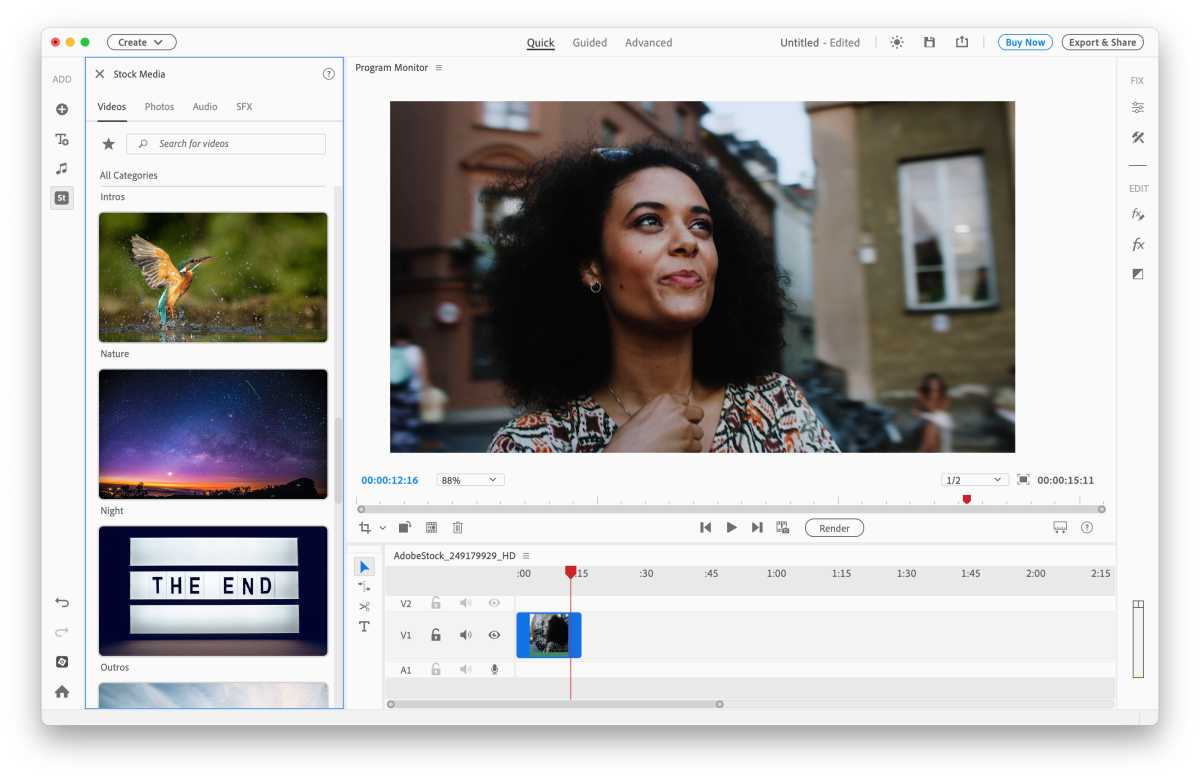
At a GlanceExpert's Rating Pros Extensive range of video-editing tools Quick mode and Guided Edits for beginners Powerful colour correction tools Good tools for creating text and titles Cons Even Quick mode is pretty complex Now sold with only three-year license Dense, unhelpful documentation Our Verdict It’s certainly a powerful video-editing tool, with advanced features for creating titles and artistic effects. However, Premiere Elements isn’t easy to master, and may be too complex for people who just want to post on Instagram. Price When Reviewed This value will show the geolocated pricing text for product undefined Best Pricing Today Retailer Price Adobe €99.60 View Deal Price comparison from over 24,000 stores worldwide Product Price Price comparison from Backmarket Price When Reviewed99,60 € Best Prices Today: Adobe Premiere Elements Retailer Price Adobe €99.60 View Deal Price comparison from over 24,000 stores worldwide Product Price Price comparison from Backmarket Premiere Elements is the companion product to Photoshop Elements (see our review), and is designed to provide powerful video-editing tools at a competitive price. There are less expensive video-editing apps available for the Mac, but many of these simply focus on relatively simple tools for trimming video clips and applying filters and effects for use on social media. In contrast, Premiere Elements provides powerful and precise editing tools that allow you to create complex video projects using multiple video and audio clips. It also includes a variety of text tools for creating titles, and a very wide range of creative filters and effects that can create just the right look and mood for your videos. However, that extra power means that Premiere Elements is more complex than some of its rivals – and also more complex than Photoshop Elements too, despite the similarities between the two programs. Premiere Elements – Editing Tools Like Photoshop Elements, Premiere Elements provides three different editing modes, with three tabs at the top of the main editing window – Quick, Guided and Advanced – which are designed to cater to users with different levels of experience. The Quick mode is designed for beginners, and provides a simple workspace with a horizontal sceneline running across the bottom of the screen where you can drag and drop video clips and quickly arrange them in the required sequence. Above the sceneline is the Program Monitor window, which provides a larger view of individual video clips so that you can view each clip with frame-by-frame precision and decide where to make cuts or other changes. There’s also a palette on the right of the window that provides several additional tools, including a series of artistic effects, such as oil paintings, lens flare and black-and-white effects. However, even in Quick mode some of these tools are quite complex, with multiple slider controls for adjusting settings and timings that may confuse less experienced users. Fortunately, like Photoshop Elements, Premiere Elements also has a Guided mode that provides step-by-step help with some of these more complex tools. There are Guided Edits that show you how to create time-lapse effects, lighting adjustments, titles and other effects. And, for real beginners, there are two options that can do all the work for you and automatically create a Highlight Reel, or a Video Collage. All you have to do here is import a few video clips and Premiere Elements will edit the clips together, add transitions, and even offer a selection of music clips for the soundtrack. Premiere Elements 2026 – What is new Premiere Elements can download free photos, sounds and video clips from Adobe Stock. The 2026 update for Premiere Elements kicks off with one really eye-catching new feature, with the ability to import and edit 360º panoramic video files, which you can use on social media, or even to create professional-level interactive VR scenes for headsets such as Apple’s Vision Pro. The editing process is relatively easy, as Premiere Elements provides a Hand tool that allows you to click on a point within the 3D scene and then rotate and tilt your viewpoint within the scene. You can then use Premiere Elements’ filters, titling tools and other effects to edit your 360º scene just like any other video clip. The problem, though, is that the initial process of creating and importing these 360º video files is no easy task. Adobe’s Help files are rather vague, but they do explain that you require specialised dual-lens cameras manufactured by companies such as Kodak or Ricoh (with no mention as yet of the iPhone or Apple’s Immersive Video format for the Vision Pro). You’ll need a fair degree of technical knowledge in order to work with these cameras in the first place, so while this is an impressive and powerful new tool it’s one that will most likely appeal to professional film-makers or content creators who have the time, money and equipment needed to create suitable 360º videos. Premiere Elements 2026 does have some new features for more humble video hobbyists, though. The program’s text and titling tools have been improved, with new style templates and a new browser to help you find just the right style for your projects. There are new templates for creating motion titles, and new colour fonts and emojis to liven things up. The app also provides access to Adobe Stock, which is a huge library of video clips, photos and sound effects that you can use in your video projects, or just use to experiment while you’re getting to grips with the program. And, like Photoshop Elements, Premiere Elements has updated its Crop tool, with a new Freehand Crop option, and improved tool tips that provide helpful information when you hover the mouse over the toolbar. Premiere Elements 2025 – What was new Foundry Many of the new features introduced for the 2025 edition are found in the Advanced Mode, which provides full access to the program’s extensive range of editing tools, audio features, filters and effects. At first glance, Advanced Mode looks similar to Quick Mode – although the sceneline of Quick Mode is now called the timeline, indicating that more advanced features are available in this mode. The timeline has been modified for this 2025 version, with audio and video tracks grouped together for greater clarity, and the ability to lock tracks to prevent any accidental changes. There’s a new Quick Tools palette to the left of the timeline, which provides instant access to features such as the Scissor tool for splitting clips, and the Text tool for adding titles. The program’s text tools have been improved as well, with controls for quickly adjusting text size, alignment, and direction of movement. You can also download some new templates to help you create slick animated titles as well. There are improved tools for colour correction and adjusting white balance, which controls the brightness of white areas within an image, such as clouds or snow. However, some of these colour tools will challenge even more advanced users, and we found ourselves wading through the not-very-helpful Help files on Adobe’s web site to learn the differences between colour grading and colour correction. There are also changes to the program’s options for importing and exporting files, which should be useful for all users regardless of their level of experience. When you start a new project you’ll see the redesigned Media panel that opens on the left of the screen and makes it quicker and easier to import files into your projects. There are also new export options that help you to prepare your video files for social media and other platforms, starting with the Quick Export button that provides preset options covering a variety of different quality settings and resolutions. The updated Export tool now opens up a large window that provides more detailed settings for audio and video files. And one big time-saver here is the ability to simultaneously export multiple versions of the same file that can be tailored for use on different social media sites, such as Facebook, Instagram and YouTube. Foundry Photoshop Elements – How much does it cost? Both Photoshop Elements and Premiere Elements have traditionally been sold for a one-time fee of $99.99/£86.99, which allowed you to use the programs for as long as you wanted (although you did have to pay an extra fee if you wanted to purchase their annual upgrades as well). The 2026 editions of both programs still cost the same amount, but the purchase price now only grants you a three-year term license, which means that you’ll have to purchase another license in three years’ time. That’s the bad news – but the good news is that you’ll get future upgrades, such as the 2027 and 2028 editions, for free as they are likely to be released within that three-year license period. It’s also possible to buy both Elements programs together for $149.99/£130.49 (which again is for a three-year license). There’s also a seven-day free trial available, so that you can see if Premiere Elements is suitable for your own level of expertise. Purchasing Premiere Elements for the Mac also gives you access to the mobile version of the app – although this has been in beta for quite a few years now, so you should probably make sure you back-up any video files that you record on your mobile devices to keep them safe. Adobe launched a free Adobe Premiere: Video Editor mobile app for iPhone and iPad in late 2025, you can get that on the App Store. Should you buy Premiere Elements? There’s no doubt that Premiere Elements is an impressively powerful program for video-editing work, and it’s great value for more advanced amateurs and semi-professional users such as podcasters and vloggers. Even so, it’s still a pretty complex piece of software, even when using Quick mode, so newcomers will have to be prepared to roll up their sleeves and do a bit of work in order to really get to grips with the program’s undeniably powerful editing tools. For more video editing apps see our round up of the best free and cheap Mac video editors, we also have a guide to the best Mac for video editing.
https://www.macworld.com/article/668174/adobe-premiere-elements-review.html
Related News
|

46 sources
Current Date
Dec, Fri 26 - 09:34 CET
|
 Read more at Mac 911


